Alibaba all-in-one video model

Official model guide and online generator

Wan 3.0 AI Video Generator

Turn a slide deck, a PDF, a public webpage, or up to 20 references into one continuous 30-second shot at 1080P with native audio. Use the Wan 3.0 AI video generator directly below to create from a prompt, image, frame pair, or supported references.

Wan 3.0 AI video generator showcase
Alibaba's own Wan 3.0 launch footage, re-encoded for the web.

Generate with Wan 3.0 online

The complete ReelCine video workspace is embedded here and starts with Wan 3.0 selected. You can still compare variants or switch models without losing the rest of the workflow.

Loading the Wan 3.0 AI video generator…

Generation requires an account and uses credits based on the selected model, variant, duration, resolution, and other settings. Failed tasks are refunded automatically.

What is Wan 3.0 and when should you use it?

Wan 3.0 is Alibaba's all-in-one video model, in public beta since 6 August 2026 and served as wan3.0-video. It is not a text-to-video model with reference slots bolted on: text, images, video, audio, a document, and a public webpage all enter the same request, and the model decides how they relate. That is what makes it different from everything else on this site — every other model here starts from a prompt and, at most, some media. Wan 3.0 will start from a file.

Native single-shot duration
30s

Native single-shot duration

Reference assets in one request
20

Reference assets in one request

Top resolution, at 30 fps
1080P

Top resolution, at 30 fps

Pages of a document it will read
50

Pages of a document it will read

Documents and webpages

Hand it a deck, a PDF, or a URL

Wan 3.0 takes one file or one link alongside a prompt — or instead of one. A deck up to 50 pages and 100 MB, a PDF, a spreadsheet, a Markdown file, or the address of any page that does not require a login. It reads the material and directs a film from it, which is not the same as turning slide three into shot three: a deck that makes a clear argument produces a better result than one carrying dense speaker notes. Alibaba's API reference documents the request shape exactly — one attachment, one prompt, adaptive framing, a stated length — and the prompt quoted here is that documented example, abridged. The three clips are Alibaba's own published Wan 3.0 releases rather than that request's output. They are here because they exercise what file input actually depends on: legible type, real layout, and graphics that keep their shape while the camera moves.

What file input depends on

Interface cards and app UI
Maps, diagrams, and type

A premium smart-glasses product ad. Minimal, futuristic, restrained lighting; black, silver-grey and ice-blue, with soft white highlights and parameter UI graphics. The glasses emerge from darkness, the camera passes close over lens, nose pads, hinge and temples, then the product rotates in mid-air while the key specifications appear as minimal motion graphics.

Capabilities

What thirty seconds and thirty frames a second actually buy you

One take, not four stitched together

Thirty seconds arrives as a single generation. The clip beside this one runs the full length: a roadside stop, an arrival, and a punchline, with the light, the grade, and the geography holding the whole way through. Assembling that from three five-second clips means matching all three afterwards, and the seams are usually where the illusion dies.
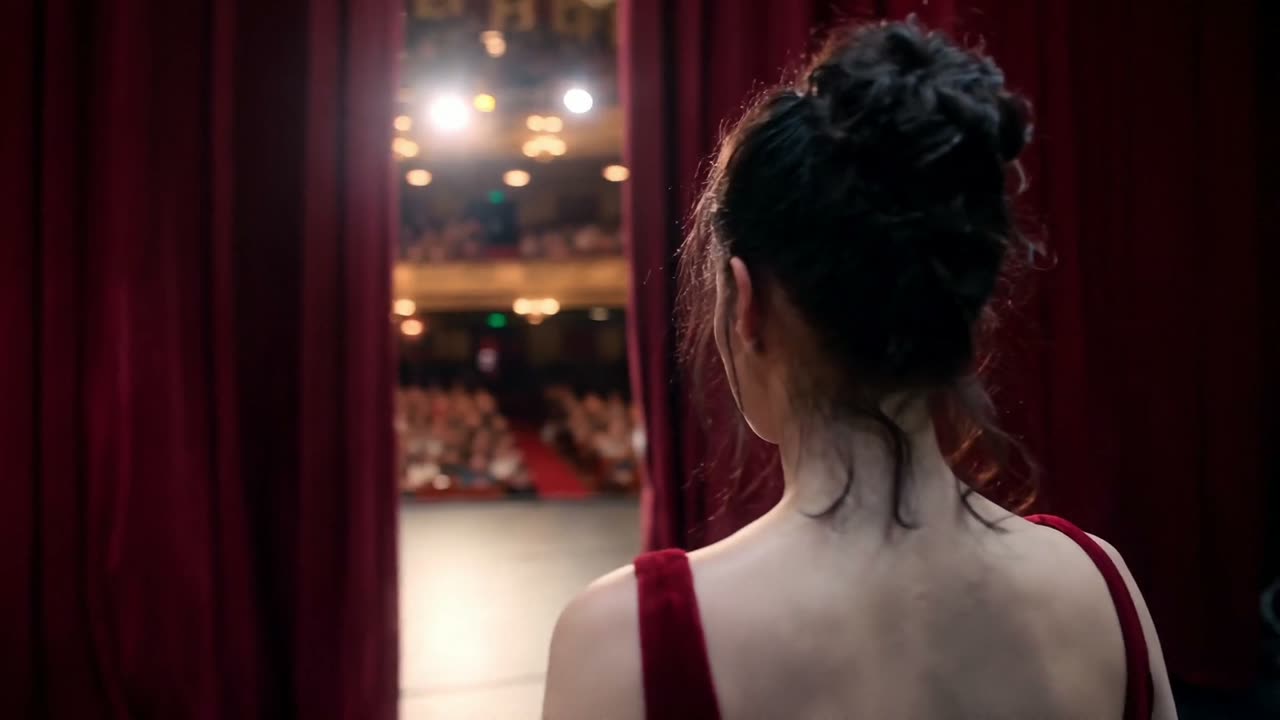
The same face, shot after shot

Alibaba's claim is pixel-level reproduction of reference detail, and it is the claim that decides whether the model is usable for delivery. Across a cut, a lighting change, and a camera move, the costume, the hair, and the face have to be the same ones — otherwise every generation is a casting session.

Weight, texture, and contact

Long shots expose physics. Thirty frames a second gives contact — a finger pressing into dough, flour lifting and settling — enough samples to look like it obeys gravity, which is where shorter, lower-frame-rate output tends to go soft.

What one request can carry

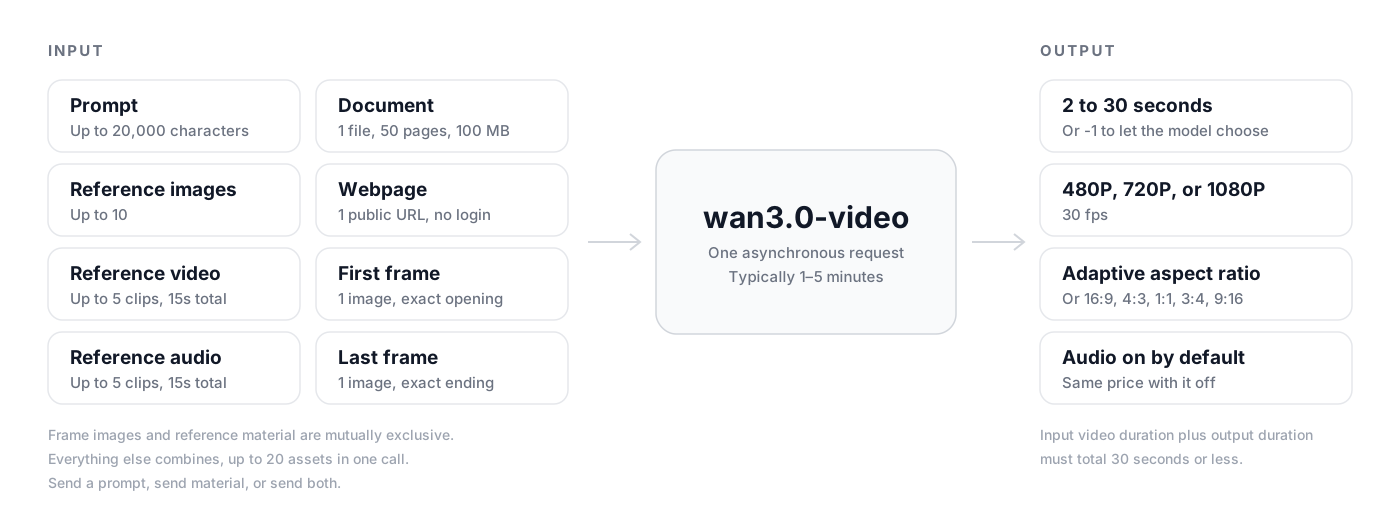
Alibaba has not published an architecture for Wan 3.0; the weights are closed. What it does publish is the contract, and the contract is the more useful thing to know before you open the generator. This is that contract, drawn from the Model Studio API reference: everything on the left can go into a single call, and everything on the right is what comes back.

Diagram of the Wan 3.0 request contract: prompt, reference images, video, audio, one document or one webpage, and first and last frame images entering wan3.0-video, returning a 2 to 30 second video at up to 1080P and 30 fps with audio

Wan 3.0 compared with HappyHorse 1.1

Both are Alibaba models and both run on ReelCine. HappyHorse 1.1 is still the quicker, cheaper pick for a short image-led clip. Wan 3.0 is the one to open when the shot has to run long, carry real reference material, or start from a file.

CapabilityHappyHorse 1.1Wan 3.0
ReleasedJune 2026August 2026
Maximum duration15 seconds30 seconds
Frame rate24 fps30 fps
Resolution720p and 1080p480P, 720P, and 1080P
Reference materialUp to 9 images10 images, 5 video clips, and 5 audio clips
Documents and webpagesNot supportedOne file to 50 pages, or one public URL
Frame controlOne starting imageFirst frame, last frame, or both
Duration controlA length you pickA length you pick, or one the model picks

Four jobs it is already doing

Every clip below is Alibaba's own Wan 3.0 material, re-encoded for the web. Open the generator above to work in the same modes.

Product films from a spec deck

Attach the deck you already wrote for the launch and let Wan 3.0 stage the product: close passes over material and finish, a rotation with the numbers on screen, a clean end card.

Ecommerce and lookbook detail

Reference images of the actual garment or product hold their stitching, weave, and hardware across a 30-second cut, which is the part that decides whether an ecommerce clip is usable.

Vertical social cuts

Generate 9:16 natively rather than cropping a landscape master, and let the model run the full length a feed will actually play instead of a five-second loop.

Character-led narrative

Give it a face as a reference image and the same person survives a cut, a lighting change, and a camera move — long enough to carry a scene rather than a beat.

Start generating

How to create video with Wan 3.0

Move from a creative idea to a configured Wan 3.0 generation without leaving this model page.

1

Describe the shot

Write the subject, action, environment, camera, style, timing, and sound. If you have reference media, upload it and explain the role of each asset.

2

Configure Wan 3.0

Keep Wan 3.0 selected, choose the appropriate variant, mode, duration, aspect ratio, resolution, and audio settings, then check the displayed credit cost.

3

Generate, review, and reuse

Start the task, follow progress in the result panel, review the completed video, reuse its settings for another take, or download the finished file.

Wan 3.0 AI video generator FAQ

What is Wan 3.0?

Wan 3.0 is Alibaba's all-in-one video generation model, in public beta since 6 August 2026 and served through Model Studio as wan3.0-video. It unifies text to video, image to video with first and last frame control, and reference to video, and it is the first model in the Wan family that accepts documents and public webpages as input. The weights are closed.

Can Wan 3.0 turn a PowerPoint or PDF into a video?

Yes. Attach one file to the request and Wan 3.0 reads it and generates a video from it. It re-directs the material rather than transcribing it, so it will not reliably map slide three to shot three — treat the deck as the brief, not the storyboard. You can attach a file with no prompt at all, or add a prompt to steer the tone, pacing, and framing.

Which file types and limits does it accept?

DOCX, DOC, XLSX, XLS, PPTX, PPT, PDF, TXT, MD, and Apple's Keynote, Pages, and Numbers. One file per request, up to 100 MB and 50 pages. A file and a webpage URL cannot be sent in the same request, and neither can be combined with first or last frame images.

Can Wan 3.0 read a webpage?

It accepts one public URL per request — a news article, a blog post, a product page — as long as the page does not require a login. Pages behind authentication, paywalls, or bot checks will not parse.

How long can a Wan 3.0 video be?

2 to 30 seconds, generated as one continuous shot at 30 fps. You can also let the model choose the length from your prompt and material. If you supply reference video, the input duration and the output duration together have to stay within 30 seconds.

How many references can one request take?

Up to 10 reference images, 5 reference video clips, and 5 reference audio clips — 20 assets in a single call. Video and audio clips run 1 to 15 seconds each, with 15 seconds total for each kind. Reference material and first or last frame images are separate modes and cannot be mixed.

Does Wan 3.0 generate audio?

Yes, and it is on by default. You can switch it off to receive a silent master, but the generation costs the same either way, so there is rarely a reason to.

What does Wan 3.0 cost on ReelCine?

Credits are charged per second of output and scale with resolution: 720P costs twice what 480P costs, and 1080P costs twice 720P. Audio does not change the price. The exact credit cost for your settings appears in the generator before you start, and failed tasks are refunded.

Is Wan 3.0 open source?

No. Earlier Wan releases were opened, but Wan 3.0 ships as a closed-weight model available through Alibaba Cloud Model Studio. On ReelCine it runs through APIMart, so there is nothing to install and no GPU to rent.

Official Wan 3.0 sources

Model capabilities and media on this page were researched from the developer's official product pages, announcements, and documentation.

Create your next video with Wan 3.0

Open the complete Wan 3.0 AI video generator above, add your prompt or references, and turn the next shot on your list into a finished video.

Start generatingBrowse all models