Preserve motion and timing
Use the source clip to guide body movement, object paths, cuts and camera rhythm so the new version follows a performance you already approved.
Upload a source clip and describe a new visual direction. ReelCine restyles the video while using its movement, timing and camera path as a guide for the generated result.
Generation requires an account and uses credits based on the model and duration you choose. Source-video limits vary by model, and failed tasks are refunded automatically.
Pause each finished style on the left, then watch the same result move on the right. Copy the direction or load it into the restyle generator above.
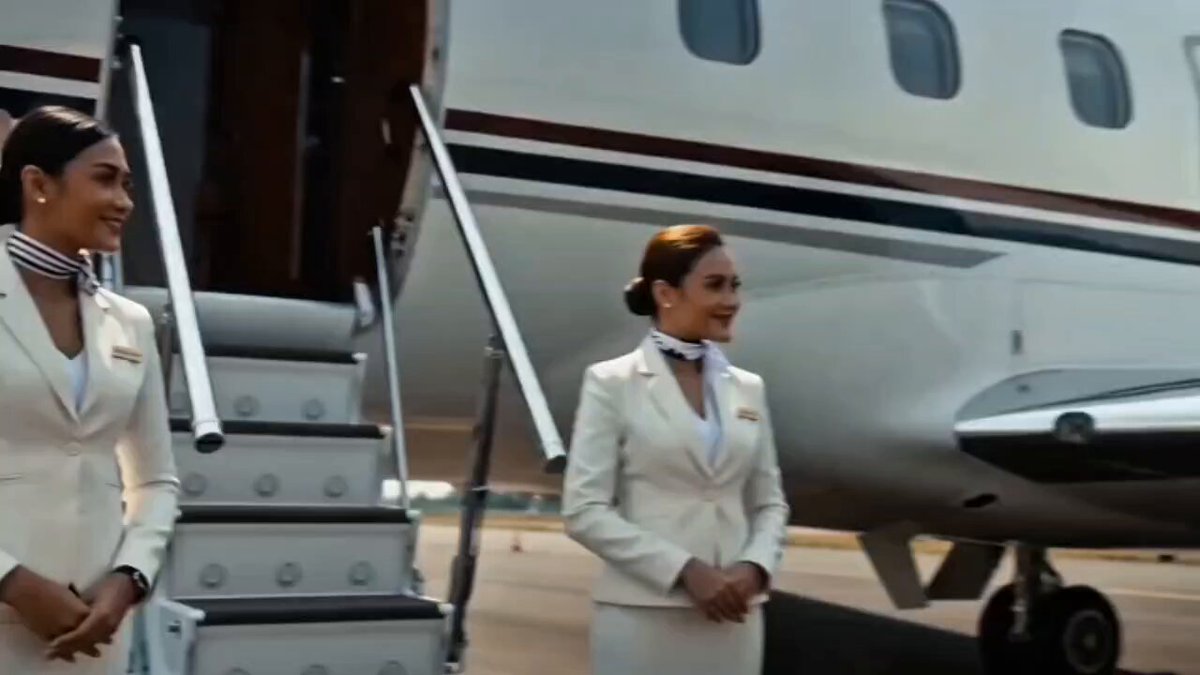 Style Frame
Single continuous uninterrupted cinematic shot, no cuts, one flowing 15-second take. Shot on ARRI Alexa with anamorphic lenses, photorealistic live-action film, NOT animated, NOT a video game, NOT CGI render. On a private jet runway tarmac in bright daytime, a sleek private jet parked with its boarding stairs lowered. Cinematic color grading, crisp natural daylight, heat shimmer off the tarmac, clean reflective surfaces, filmic contrast, natural film grain, shallow depth of field. Photorealistic textures, real human skin, realistic materials and reflections.The single camera begins up close beside the boarding stairs where a few beautiful female flight attendants wait — elegant, professional, well-groomed women in crisp tailored white uniforms with welcoming smiles. There is no one else around, only the attendants. The man [imageReference] rides into frame on a premium futuristic motorcycle and comes to a normal, smooth, calm stop right in front of the camera — an ordinary gentle braking with no dust, no skid, no dramatic impact, just easing to a stop. He wears relaxed but refined vacation clothing — a clean fully-buttoned short-sleeve shirt, smart casual trousers, sunglasses, and clean white sneakers, looking effortlessly cool. The motorcycle is an elegant high-end design finished in deep glossy black and metallic red, premium and sophisticated.Without any cut, the same camera flows with him as he swings off the bike confidently and the female attendants greet him warmly. The camera continues unbroken, keeping him in a wider full view from a distance, as he steps beside the motorcycle and presses a button on the bike — seen naturally from afar in the same wide framing, no close-up. The button lights up and the motorcycle responds: its panels smoothly fold and retract, the frame compacting and reconfiguring with precise futuristic mechanical motion, wheels tucking in, the whole machine collapsing down and reshaping itself into a sleek premium rolling suitcase in the same matching deep black and metallic red finish, a telescopic handle rising up. The same camera orbits gently around the transformation, never cutting. The female attendants react with amazement.Still in the same continuous unbroken take, the camera follows as the man casually grabs the suitcase handle, gives it a confident look, and walks at a relaxed unhurried pace pulling the rolling suitcase behind him to the boarding stairs. The shot ends just as he steps onto the first steps and begins to ascend, the camera trailing smoothly behind and to the side — all in one single flowing continuous shot with no cuts anywhere.Photorealistic, premium, clean luxury commercial film look, one smooth steady continuous camera move, restrained cinematic color palette, filmic grain.
Use an existing performance or camera move as the motion foundation, then replace the art direction, environment, materials, lighting or subject treatment.
Seedance 2.5, Seedance 2.0 and Gemini Omni Flash currently accept a source video for restyling. They differ in duration, reference limits, audio behavior and how strongly they preserve the original structure.
Four reasons to start from footage instead of rebuilding the performance from a text prompt.
Use the source clip to guide body movement, object paths, cuts and camera rhythm so the new version follows a performance you already approved.
Move from live action to illustration, animation, film, fantasy or a material-driven look without manually repainting each frame.
The source supplies framing and spatial relationships, giving the model more structure than a prompt alone when several subjects move at once.
Turn one useful performance into several campaign, social or concept variations while keeping its core action and editorial timing.
Bring the motion, describe the new world, and compare the result with the source.
Choose a clear clip whose movement, timing or camera path is worth preserving. Short, stable footage gives the model an easier structure to follow.
Name the visual style, setting, materials, lighting and subjects to change, then state which motion, framing and beats must remain from the source.
Render a short restyle, compare its movement with the original, and tighten the prompt around anything that changed too much before creating another version.
Six ways video to video turns usable motion into a new creative asset.
Convert a filmed performance into anime, painterly 2D, stop-motion or stylized 3D while keeping the actor's broad movement and shot timing.
Reuse an existing product turn, hand interaction or camera pass while changing the set, lighting, season and surrounding materials.
Keep choreography and editorial rhythm from a source take, then explore surreal, graphic, retro or cinematic treatments around the performance.
Create multiple visual concepts from one short clip for different posts, launches or audiences without asking the performer to repeat the action.
Turn simple blocking footage into a fast concept for a creature, environment, costume or effects shot before committing to the final production.
Shift an evergreen clip into winter, summer, launch-day or event-specific art direction while preserving the action that already works.
Explore style-driven video prompts from the ReelCine gallery. Pick a result to load its visual direction into the generator and adapt it to your source clip.
Video to video is available through the models that support source clips. Credit use follows the selected model and duration, with failed generations refunded automatically.
A video to video AI generator creates a new clip from an existing source video and a written direction. Instead of inventing all motion from text, it uses the source's movement, timing, composition or camera path as guidance for the transformation.
Image to video starts from a still frame and has to invent what happens next. Video to video begins with motion that already exists, making it better when you want to preserve a performance, camera move, object path or edit rhythm while changing the appearance.
The current generator supports video to video through Seedance 2.5, Seedance 2.0 and Gemini Omni Flash. The model selector filters out models that cannot accept a source video in Restyle mode.
Use a short, clear clip with readable movement and limited compression. Stable framing and an unobstructed subject are easier to preserve. Busy cuts, motion blur and tiny subjects give the model less reliable structure to follow.
Limits depend on the model. Seedance 2.5 currently accepts source clips between 2 and 30 seconds, while Seedance 2.0 accepts roughly 1.8 to 15.2 seconds. Gemini Omni Flash accepts one source video up to 24 seconds.
It uses the source as guidance rather than performing a frame-perfect filter pass. Broad movement, timing and composition can carry over well, but hands, faces, small objects and rapid motion may vary. State the parts that must remain unchanged in the prompt.
You can ask the model to preserve the subject and motion while replacing the environment, but generative restyling may still alter lighting, edges or fine subject details. A clear subject and a specific preservation instruction improve separation.
Yes. Style transformation is one of the main uses for video to video. Describe the rendering language, line work, color, lighting and material treatment, while explicitly asking the model to retain the source performance and camera timing.
Audio behavior depends on the selected model and request. Seedance can generate native sound for the transformed clip, but you should keep a separate copy of the original audio whenever its exact dialogue, music or timing must be preserved in final editing.
The requested visual change may be competing with the motion constraint, or the source may contain fast cuts and occlusion. Shorten the clip, simplify the transformation and list the motion and composition that must remain before adding secondary style details.
You can upload a source and configure the restyle without paying. Generating requires an account and credits; new accounts receive 15 free credits, and tasks that fail are refunded automatically.
Commercial use is included on paid plans, subject to the current terms. You must own or license the source footage, people, music, logos and other material in the upload; AI restyling does not replace those permissions.
Upload a clip with movement worth keeping, describe the visual world you want instead, and generate a new version without rebuilding the performance.
Restyle My Video