Home
Seedance 2.5 is live — 4 to 30 seconds, native audio, up to 50 references

Seedance 2.5 AI Video Generator

Turn text or an image into cinematic, multi-shot video with native audio. ReelCine runs Seedance 2.5 right here — free to try, no sign-up, no watermark.

  • Free to try
  • No sign-up
  • No watermark
Loading the AI video generator…

Generation requires an account and uses credits based on the selected model and settings. Failed tasks are refunded automatically.

Text to video, image to video, and every way in

Made with Seedance 2.5

What Seedance 2.5 can do

Every way into a shot, in one AI video generator

Text to video, simplified

Text to video is the shortest path from an idea to footage: describe the subject, the action, the camera move and the light, and Seedance 2.5 renders the shot. There is no timeline to learn and no footage to source. The prompts that work read like a compact shot list rather than a wish — name the camera and the order of events and the output changes predictably, which is what makes this model worth writing carefully for.
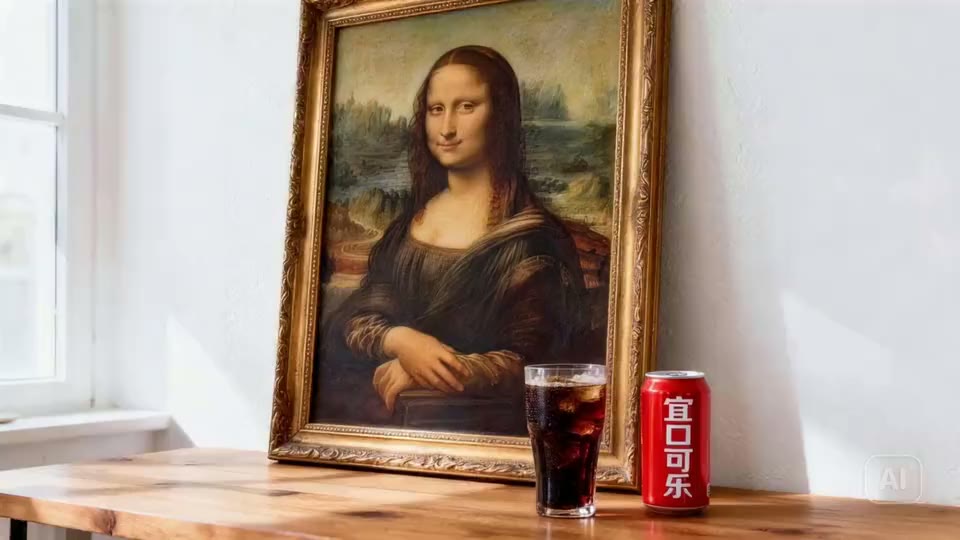

The still image this AI video was generated from
Start frame

Know how your video starts and ends

Image to video animates a still you already have. Attach a second image and Seedance 2.5 treats the pair as the first and last frame, moving deliberately between them instead of drifting. It is the control that matters most for product shots and character work: the composition you approved is the frame the clip opens on, and the frame it lands on is the one you picked.

Native audio in more than 10 languages

Most AI video arrives silent and needs a second pass for sound. Seedance 2.5 generates audio natively alongside the picture in more than ten languages — dialogue, ambience, music and effects — and it accepts audio-only references when you want a specific voice or texture. Writing the soundtrack into the prompt removes an entire round of post-production from a short.

Reference up to 50 images, videos and audio clips

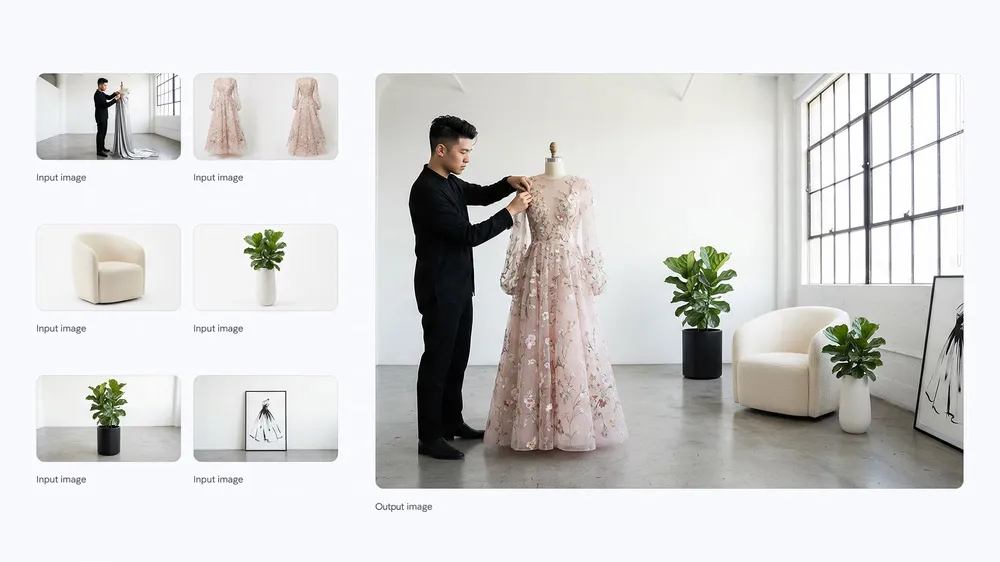
Multimodal reference is where consistency comes from. Supply up to 30 images, 10 videos and 10 audio clips — 50 assets in total — and give each one an explicit job in the prompt: this sets identity, this sets style, this sets movement. A character, a product or a look can then survive across every shot in a sequence instead of being re-rolled each time.

Built on the numbers that matter

Any whole second, one take
4–30s

Any whole second, one take

Image, video and audio refs
50

Image, video and audio refs

Languages of native audio
10+

Languages of native audio

Across 21:9, 16:9, 9:16 and four more ratios
720p

Across 21:9, 16:9, 9:16 and four more ratios

9 integrated video models

Choose the right AI video model for your next shot

Text to videoImage to videoFirst & last frameReferences to videoVideo to videoText, Image & Video InputSmart Prompt EnhancementPlatform-Ready ExportLightning-Fast GenerationFree to Start, Scale as You Grow

The free AI video generator built on Seedance 2.5

A free AI video generator you can use right now

Most people looking for an AI video generator want to try one before deciding anything.

ReelCine is built for that: the generator sits in the first screen, it opens without an account, and new accounts start with free credits so the first clips cost nothing. There is no watermark burned into the output and no trial timer counting down. Write a prompt, pick a duration and an aspect ratio, and generate.

If a task fails, the credits go back automatically, so experimenting is genuinely free of risk. That matters more than it sounds — good AI video comes from iteration, and iteration only happens when a failed take is cheap.

Text to video, image to video, and everything between

Text to video is the fastest way in: describe the subject, the action, the camera move, the lighting, and the sound, and Seedance 2.5 renders the shot.

Image to video starts from a still you already have — a product photo, a character render, a frame from a storyboard — and adds motion without reinventing the composition. Supply two images and the model treats them as the first and last frame, moving deliberately between them.

Multimodal references go further still, letting you pin identity, style, and movement with up to fifty assets. As an AI video maker, the point is not that one of these modes is best; it is that the same workspace covers all of them, so the mode follows the shot rather than the other way round.

Why Seedance 2.5 specifically

Seedance 2.5 is ByteDance’s current flagship video model, and it is unusually strong in the places short-form work actually breaks.

Duration is any whole number of seconds from four to thirty, so a shot is not forced into a fixed clip length. Audio is generated natively alongside the picture in more than ten languages, which removes an entire round of post-production.

Instruction following is tight enough that naming a camera move or an order of events changes the output predictably. And precise editing and extension mean a take that is nearly right can be pushed the rest of the way instead of being regenerated from scratch.

Start from something that already worked

The hardest part of AI video is not the model, it is knowing what to write.

Underneath the generator sits a wall of thousands of real Seedance generations, each one paired with the exact prompt that produced it. Clicking any clip loads its prompt straight into the generator above — no new tab, no copying and pasting.

Change the subject, keep the camera language, and generate. It is the fastest way to learn what this model responds to, and it turns a blank prompt box into an editing job.

Seedance 2.5 AI video generator FAQ

How the Seedance 2.5 AI video generator works on ReelCine — inputs, limits, pricing, and rights.

What is Seedance 2.5?

Seedance 2.5 is ByteDance’s latest professional video model. It generates any whole-number duration from 4 to 30 seconds, accepts up to 50 multimodal references, supports precise editing and extension, and produces native audio in more than ten languages. ReelCine puts the complete Seedance 2.5 AI video generator on this page so you can go from an idea to a finished shot without opening another workspace.

Is this Seedance 2.5 AI video generator free?

You can open the generator, write a prompt, and explore every control without an account. Generating a video uses credits, and new accounts start with free credits, so there is a free way to produce your first clips. Failed generations are refunded automatically, so a bad take never costs you anything.

How does text to video work?

Text to video takes a written description and turns it into footage. The strongest prompts read like a compact shot list: subject, ordered action, environment, camera move, lighting, visual style, timing, and sound. Seedance 2.5 follows instructions closely, so naming the camera and the beat of the action changes the result far more than adding adjectives.

How does image to video work?

Image to video starts from a still you upload and animates it. Use it when the composition, character, or product already exists and you want motion added rather than invented. Attach a second image to define the closing frame, and the model will move between the two.

What can I upload as a reference?

Up to 30 images, 10 videos, and 10 audio clips, capped at 50 assets in total. Give each asset an explicit job in the prompt — which one sets identity, which sets style, which sets movement. Left unexplained, the model has to guess, and guesses are where consistency breaks down.

Can Seedance 2.5 generate sound?

Yes. Seedance 2.5 creates native audio alongside the picture in more than ten languages, and it can take audio-only references. Write dialogue, ambience, music, and effects as deliberate parts of the prompt rather than leaving the soundtrack to chance.

How long can a clip be, and at what resolution?

Any whole number of seconds from 4 to 30, at 480p or 720p, across 21:9, 16:9, 4:3, 1:1, 3:4, 9:16, and Smart Aspect Ratio. Work out the shot at a lower resolution first; resolution sharpens a good take but will not rescue a weak one.

Can I use the videos commercially?

Videos you generate are yours to use, including in commercial work. You remain responsible for what you prompt — avoid real people’s likenesses, trademarks, and copyrighted material you have no right to use.

How is ReelCine different from other AI video makers?

Most AI video generators put a marketing page between you and the model. ReelCine puts the working Seedance 2.5 generator in the first screen, with thousands of real generations underneath it. Click any of them and its prompt loads straight into the generator, so you start from something that already worked.

How long does a generation take?

Most clips finish in under a couple of minutes; longer durations, higher resolutions, and heavier reference sets take proportionally more. Progress is shown while the task runs, and finished videos stay in your history for reuse and download.